Best Social Media Scheduler for E-Commerce 2026
The best social media scheduler for e-commerce in 2026 is one that lets you plan product launches, flash sales, and UGC campaigns across Instagram, TikTok, Facebook, and Pinterest, without paying per account or posting manually at midnight. A flat-rate tool with bulk scheduling, visual previews, and basic analytics keeps your store visible while you focus on fulfillment and customer service.
Why E-Commerce Brands Need a Scheduler in 2026
Organic social still drives discovery for DTC and marketplace sellers. Shoppers scroll Reels before they search Google, and a quiet feed signals a quiet store. The problem is not whether to post, it is whether you can post consistently while packing orders and handling support tickets.
A scheduler solves three e-commerce pain points at once:
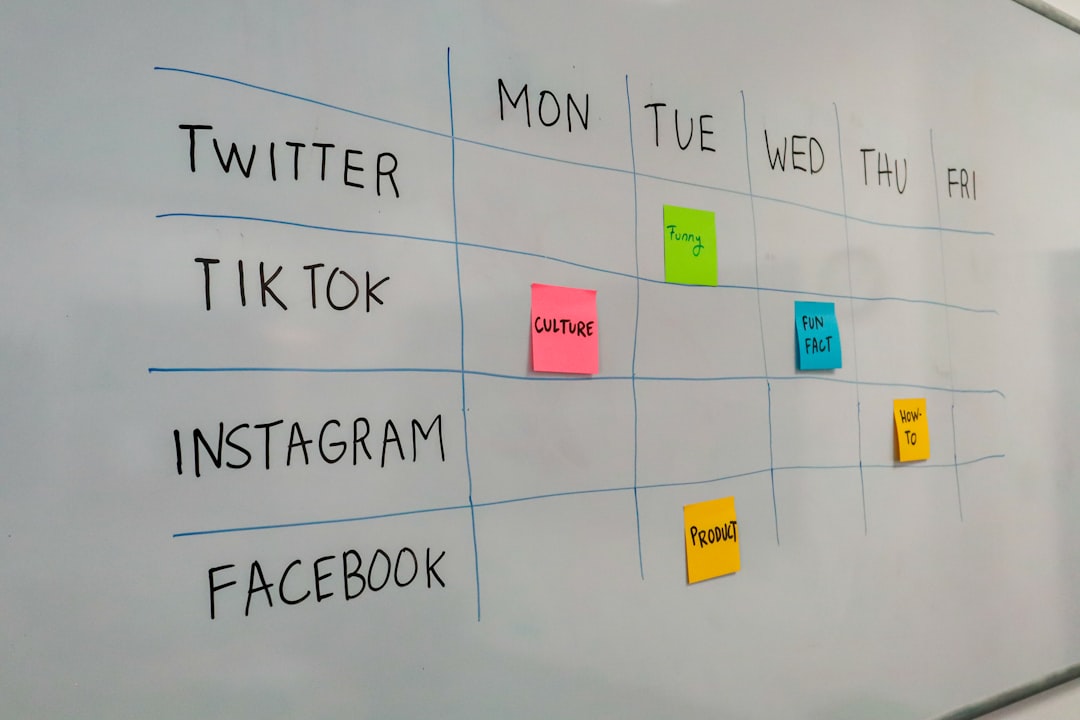
- Launch coordination, Tease a drop on Monday, go live Tuesday, follow up with reviews on Friday, all queued in advance
- Seasonal spikes, Black Friday, holiday gifting, and summer sales need dozens of posts across weeks, not last-minute scrambles
- Margin protection, Per-channel pricing ($6 × 8 accounts = $48/month) eats into tight DTC margins; flat-rate tools scale better
Pair your calendar with our free content calendar template and best time to post guide so product posts land when shoppers are actually scrolling.
Must-Have Features for E-Commerce Schedulers
Visual content support
Product carousels, lifestyle Reels, and unboxing clips are non-negotiable. Your tool should handle images, video, and multi-image posts without forcing awkward crops. Use the image crop tool to prep feed, Story, and Reel-safe sizes before upload.
Multi-platform publishing
Instagram and TikTok drive impulse buys; Facebook still matters for older demographics; Pinterest captures long-tail search intent. One dashboard beats logging into four apps daily.
Bulk scheduling and calendar view
New collection dropping? Schedule 15–20 posts in one sitting. Drag-and-drop calendars make it easy to spot gaps before a launch week.
Affordable, predictable pricing
Most small stores should stay under $25–50/month. Avoid tools that charge per channel once you connect a store account, ad account, and founder personal brand.
Analytics that tie to action
Track saves, clicks, and engagement by post type. You do not need enterprise BI, just enough data to double down on carousels that convert and cut formats that flop.
Best Social Media Schedulers for E-Commerce 2026
1. CuteDyno
Pricing: $12.50/month (Freelancer) | $25/month (Agency)
Highlights:
- Unlimited social accounts, store, founder, wholesale partners
- Instagram, Facebook, TikTok, LinkedIn, YouTube from one social media scheduler
- Bulk scheduling, calendar view, approval workflows for teams
- Analytics included on paid plans
Best for: DTC brands, Shopify sellers, and agencies managing store clients. Start a free trial or compare pricing if you are scaling past one brand.
2. Later
Pricing: Free | $25–80/month
Highlights:
- Visual grid planner ideal for product aesthetics
- Instagram, TikTok, Facebook, Pinterest
- Best Time to Post and hashtag suggestions
- Link-in-bio tool for shoppable landing pages
Best for: Visual-first brands obsessed with feed cohesion. Account limits on lower tiers can pinch multi-store operators.
3. Buffer
Pricing: $6/month per channel
Highlights:
- Clean, beginner-friendly interface
- Pinterest, Instagram, Facebook, TikTok
- AI-assisted captions via third-party integrations
Best for: Single-brand stores with 3–5 channels. Costs climb fast at 8+ connections.
4. Pallyy
Pricing: $25/month (1 social set)
Highlights:
- Visual grid and Canva integration
- Instagram and TikTok focus
- Unlimited scheduling within a social set
Best for: One-store brands prioritizing Instagram and TikTok aesthetics.
5. Metricool
Pricing: Free | $9.99–19.99/month
Highlights:
- Free tier for testing
- Competitor benchmarking and reporting
- Multi-platform support
Best for: Budget-conscious stores validating which platforms deserve paid spend.
E-Commerce Content Calendar Framework
Structure your week around buyer intent, not random inspiration:
| Day | Content focus | Example post |
|---|---|---|
| Mon–Wed | Product education | "3 ways to style our bestseller" |
| Thu–Fri | Promotions | Flash sale countdown, free-shipping reminder |
| Weekend | Social proof | UGC reposts, review screenshots, unboxings |
| Launch week | Sequence | Teaser → launch → restock → FAQ |
For caption drafts, try the AI caption generator and hashtag generator to speed up batch days without sounding robotic.
How to Choose the Right Tool for Your Store
Ask five questions before you commit:
- How many accounts? One store with 4 channels vs. three sub-brands changes the math entirely.
- Who creates content? Solo founder vs. agency vs. in-house team determines whether you need approval workflows.
- Which platforms drive revenue? Double down scheduling budget on channels that show up in your Shopify analytics.
- What's your monthly tool budget? Under $15/month points to CuteDyno Freelancer or Metricool; agencies often land on CuteDyno Agency.
- Do you cross-post video? If yes, read repurpose short-form video across platforms and schedule TikTok plus Reels from the same calendar.
Common E-Commerce Scheduling Mistakes
Posting only product shots. Mix education, behind-the-scenes, and UGC so the feed feels human, not a catalog.
Ignoring per-channel pricing. Buffer at 10 channels costs more than many flat-rate alternatives, run the numbers before you scale.
Skipping UTM tracking. Tie social posts to revenue with our UTM link builder so you know which Reels actually sell.
Scheduling and forgetting. Review queued posts weekly for sold-out SKUs, expired promo codes, and outdated shipping messaging.
Getting Started in Three Steps
- Pick a scheduler, Try CuteDyno free or test Metricool's free tier if budget is tight
- Connect store accounts, Instagram Shop, Facebook Page, TikTok, and any secondary channels
- Batch your first two weeks, Product highlights, one sale post, two UGC slots, one educational Reel
Need platform-specific help? See how to schedule Instagram posts and affordable scheduler guide.
Frequently Asked Questions
What is the best social media scheduler for Shopify stores?
CuteDyno and Later are strong picks for Shopify sellers who post visual product content to Instagram and TikTok. CuteDyno wins on unlimited accounts and flat pricing; Later wins on grid planning and Pinterest support.
Can I schedule TikTok product videos for my store?
Yes. TikTok supports native scheduling for Business accounts, and third-party tools like CuteDyno let you queue further ahead with a calendar view. See how to schedule TikTok posts in 2026 for step-by-step setup.
Does scheduling hurt reach on Instagram or TikTok?
No. Platforms treat scheduled and manual posts the same. Content quality, hook strength, and posting time matter far more than how the post was published.
How far ahead should e-commerce brands schedule posts?
Plan 2–4 weeks ahead for evergreen product content. Leave 20–30% of your calendar open for flash sales, trending audio, and reactive posts.
Is a free scheduler enough for a new online store?
Often yes at the start. Metricool and Later offer free tiers; Meta Business Suite is free for Instagram and Facebook. Upgrade when you need bulk scheduling, multiple brands, or team approvals.
How much should an e-commerce brand spend on scheduling tools?
Most small stores stay between $0 and $25/month. If social drives meaningful revenue, $12.50–25/month on a flat-rate tool is typical, and far cheaper than one hour of founder time per week.
More to read: Best Scheduling Tools Comparison · Scheduler for Small Business · Schedule Instagram · Free Content Calendar