Every Facebook or Instagram ad has two pieces of creative: the ad your team publishes and the conversation that forms underneath it.
Advertisers usually optimize the first piece. They test hooks, visuals, audiences, bids, landing pages, and offers. Then they leave the second piece exposed to fake support accounts, competitor promotion, unanswered buying questions, abusive replies, and legitimate complaints with no response.
That is a conversion risk. A prospect can read those comments at the exact moment you are paying for their attention.
The practical answer: comments can affect return on ad spend by changing whether people trust the ad, click it, and complete a purchase. Moderation does not create a guaranteed ROAS lift, and Meta does not publish evidence that hiding a comment directly improves auction delivery. The defensible mechanism is simpler: cleaner, more useful conversations can remove conversion friction, while fast, accurate answers can help ready-to-buy people move forward.
This guide explains how to protect that conversion surface across Facebook and Instagram without deleting honest criticism or turning your community into a wall of artificial praise.
The ROAS connection in one formula
Return on ad spend is:
ROAS = revenue attributed to advertising ÷ advertising spend
Comment moderation does not reduce the denominator unless it changes how efficiently your ads run. Its clearest opportunity is the numerator: the number and value of people who convert after seeing an ad.
Imagine two prospects see the same linen ad.
The first sees a fake support account asking customers to contact an unfamiliar WhatsApp number. The second sees a real buyer asking about international delivery and a specific brand reply within the thread. The media spend and creative are identical, but the purchase experience is not.
Comments can influence five moments in that journey:
| Moment | What a prospect sees | Possible business effect |
|---|---|---|
| Trust check | Scam links, abuse, praise, or resolved criticism | Confidence rises or falls before the click |
| Product research | Questions about price, fit, shipping, ingredients, or returns | Uncertainty is answered or left unresolved |
| Brand evaluation | Whether the company responds calmly and specifically | The brand appears attentive or absent |
| Click decision | A useful thread or a risky-looking one | The prospect continues or abandons |
| Purchase decision | Consistent answers across the ad and landing page | Conversion friction falls or grows |
A 2024 randomized experiment involving 272 participants found that negative comments about an advertised product reduced source credibility and purchase intention, particularly through perceived expertise and trustworthiness. That study examined sponsored influencer posts, not every Meta ad format, so it should inform your hypothesis rather than become a universal lift claim. See the PACIS study on negative comments, credibility, and purchase intention.
The right conclusion is not “delete every negative comment.” It is “manage the comment experience as part of the conversion path.”
Why every Meta advertiser should monitor comments
Paid attention amplifies whatever is underneath the ad
An organic post may reach a fraction of your audience. An active campaign can repeatedly place the same conversation in front of cold prospects. That spend only exists after the ad is approved; if Meta rejects the creative, RedClaw's guide to fixing disapproved Meta ads covers the policy, landing-page, and appeal steps that restore delivery. If a scam, false claim, or unanswered objection remains visible, your budget keeps distributing the context around it.
Meta describes ad comments as a place where people connect, debate, and discuss a brand, product, or service. Its official tools let advertisers manage Facebook and Instagram ad comments in Ads Manager, and Meta recommends addressing both positive and negative comments when possible. Read Meta's instructions for managing comments on ads and its ad comment moderation best practices.
Organic comments still shape the same brand
Do not protect only ads. A prospect may click through to your Instagram profile, open a recent Reel, browse tagged posts, or visit the Facebook Page before buying. Spam and unresolved complaints on those surfaces contribute to the same judgment.
That is why the operating model should cover:
- Facebook and Instagram ads
- Boosted posts
- Organic feed posts
- Reels and video posts
- Unpublished or dark ad posts where supported
- Older high-reach posts that still receive traffic
If you publish frequently, pair moderation coverage with a predictable posting calendar. Our guides to scheduling Facebook posts and scheduling Instagram posts help teams assign a moderation window whenever a campaign or post goes live.
The comments that hurt, help, or need a human
Treat intent, evidence, and risk separately from sentiment. A negative comment can be valuable feedback. A cheerful comment can still contain a malicious link.
| Comment type | Default action | Reason |
|---|---|---|
| Fake support account or impersonator | Hide, preserve evidence, report | It creates an immediate fraud risk |
| Scam, malicious link, or unrelated promotion | Hide | It adds risk without contributing to the discussion |
| Hate, threats, or targeted abuse | Hide or delete, then escalate | Safety and platform rules take priority |
| Buyer question with an approved answer | Reply quickly | The commenter may be close to purchase |
| Honest product or service complaint | Keep visible, acknowledge, resolve | A useful response can demonstrate accountability |
| False claim with material brand risk | Correct with evidence and escalate when needed | Silence may let misinformation spread |
| Constructive comparison with a competitor | Usually keep visible and answer | Ordinary comparison is not competitor spam |
| Praise or customer story | Like or reply when useful | Genuine social proof deserves recognition |
| Sarcasm, slang, legal claims, or uncertain context | Human review | Automated action has a higher false-positive cost |
The principle is simple:
Hide manipulation and harm. Reply to buying intent. Keep legitimate criticism visible. Escalate risk.
Over-moderation can damage trust as quickly as under-moderation. If customers notice that every difficult question disappears, a spotless thread can look manufactured.
For a deeper breakdown of business risk, read the hidden cost of spam and dirty comment sections. For native Facebook controls, use our Facebook Page comment review guide.
A complete Facebook and Instagram comment moderation workflow
The screenshots below use a fictional home-goods brand and synthetic comments inside a local CuteDyno demo account. No customer information or real commenter data appears in them.
1. Bring Facebook and Instagram comments into one inbox
The first problem is visibility. Teams miss comments because they check a Page feed but not active ads, monitor Instagram but not Facebook, or rely on personal notifications that disappear into daily noise.
Connect every supported Facebook Page and Instagram professional account, then verify coverage with a real test comment on each important surface. Your inventory should include the account owner, ad account, active campaigns, Page or profile, time zone, and person responsible for escalation.
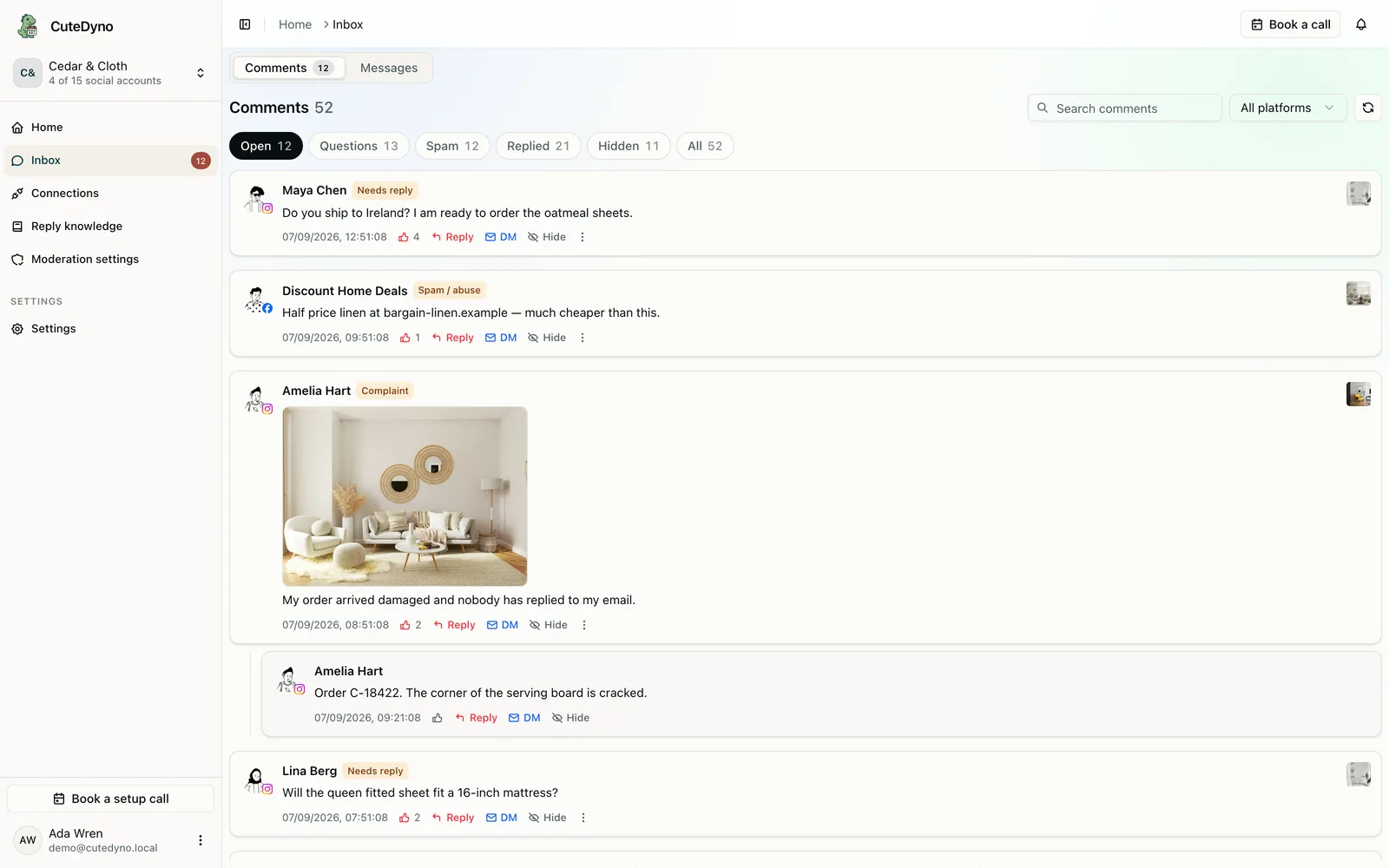
A unified inbox turns six separate decisions into one review queue. The example contains synthetic data.
The Open view above surfaces comments that still need a decision. Platform icons identify Facebook and Instagram at a glance. The team can reply, hide, mark done, or open additional Facebook actions without switching tools.
Explore the Facebook and Instagram comment inbox or see how ad comment coverage works.
2. Separate spam and abuse from customer feedback
Keyword matching is useful for repeated phone numbers, known scam domains, crypto promotion, fake-support phrases, and link patterns. It is not enough for context.
The word “scam,” for example, could appear in three very different messages:
- A bot promoting a recovery scam
- A customer warning others about an impersonator
- A customer accusing your company of fraud after a genuine service failure
Those cases should not receive the same action. Classification should consider the author, link, repetition, relationship to the post, language, risk, and confidence.
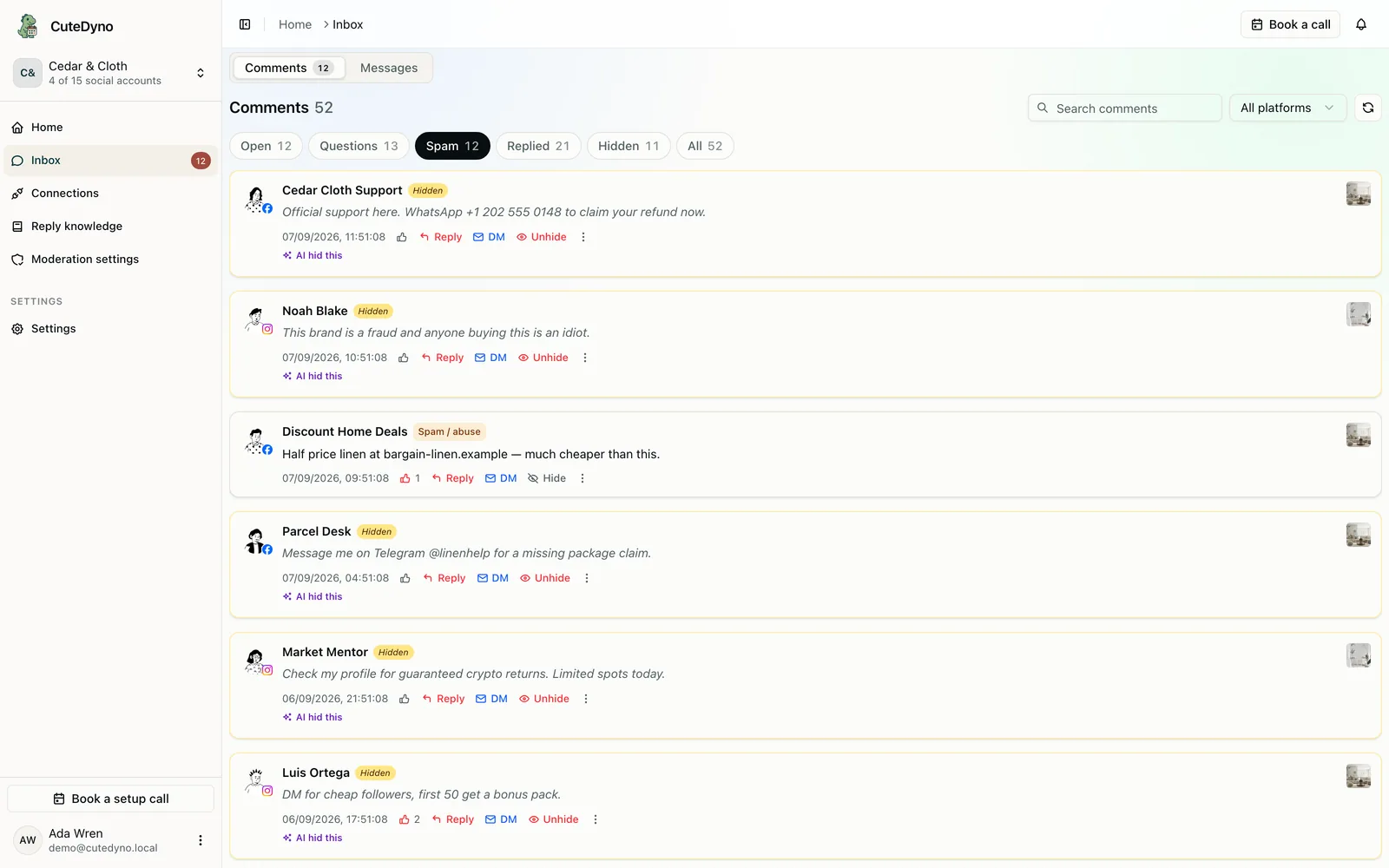
The Spam view groups likely spam and abuse while preserving an open item for review when confidence is lower.
Notice that the competitor promotion remains Open while the obvious impersonation and crypto spam are already marked Auto-hidden. Confidence thresholds reduce the chance that a broad rule hides legitimate conversation.
3. Hide high-confidence harm and keep an audit trail
For obvious spam, hiding is often the safest first response. It removes the comment from the public buying experience while preserving the item for review and possible restoration.
Meta states that Page-level blocked words and profanity filters can hide matching comments and extend to ads published by the Page. Instagram's Hidden Words controls can also hide common offensive content, scams, and custom words, phrases, numbers, or emojis. Platform behavior and labels change, so verify the current result on every connected surface. See Meta's Facebook Page moderation controls and Instagram Hidden Words guidance.
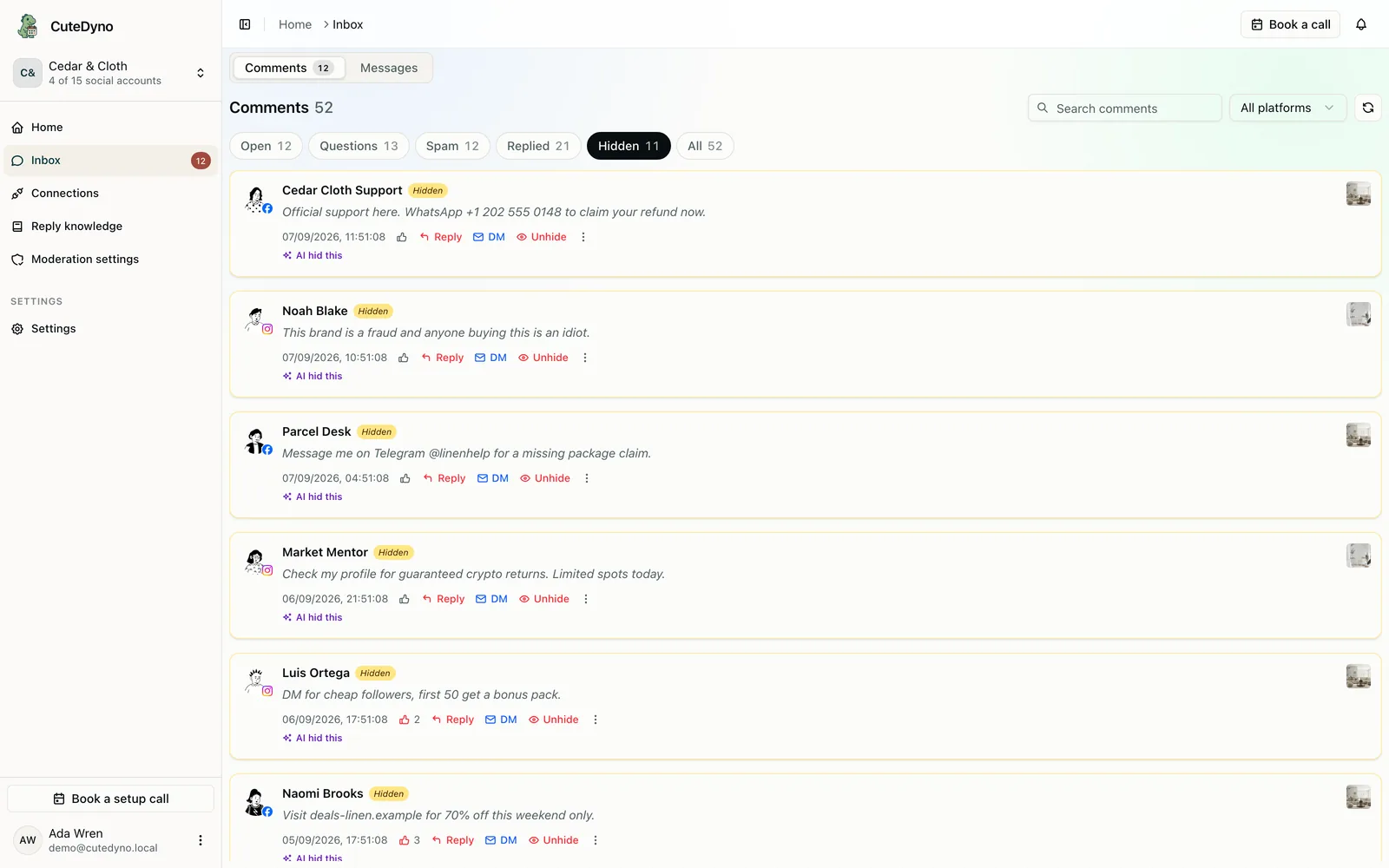
The Hidden view makes automatic actions reviewable instead of invisible to the team.
Record the original text, platform, post, timestamp, action, confidence, reason, and actor. Sample automatic hides every week. A rule that was precise last month may catch real customers after a new product launch.
Use delete more carefully. Delete when permanent removal is required, the content is dangerous, or a repeat actor is evading controls. Preserve evidence before deleting scams, threats, impersonation, or legally sensitive content.
4. Turn buyer questions into useful public answers
Not every comment is a moderation problem. Questions about shipping, stock, sizing, compatibility, delivery, returns, or pricing are sales opportunities inside the ad.
A weak answer creates more work:
“DM us.”
A stronger answer resolves the public part first:
“Yes, we ship to Ireland. Delivery usually takes 4–8 business days after dispatch. Send us your postcode by DM if you want us to confirm the exact option.”
That answer helps the commenter and every silent reader with the same question.
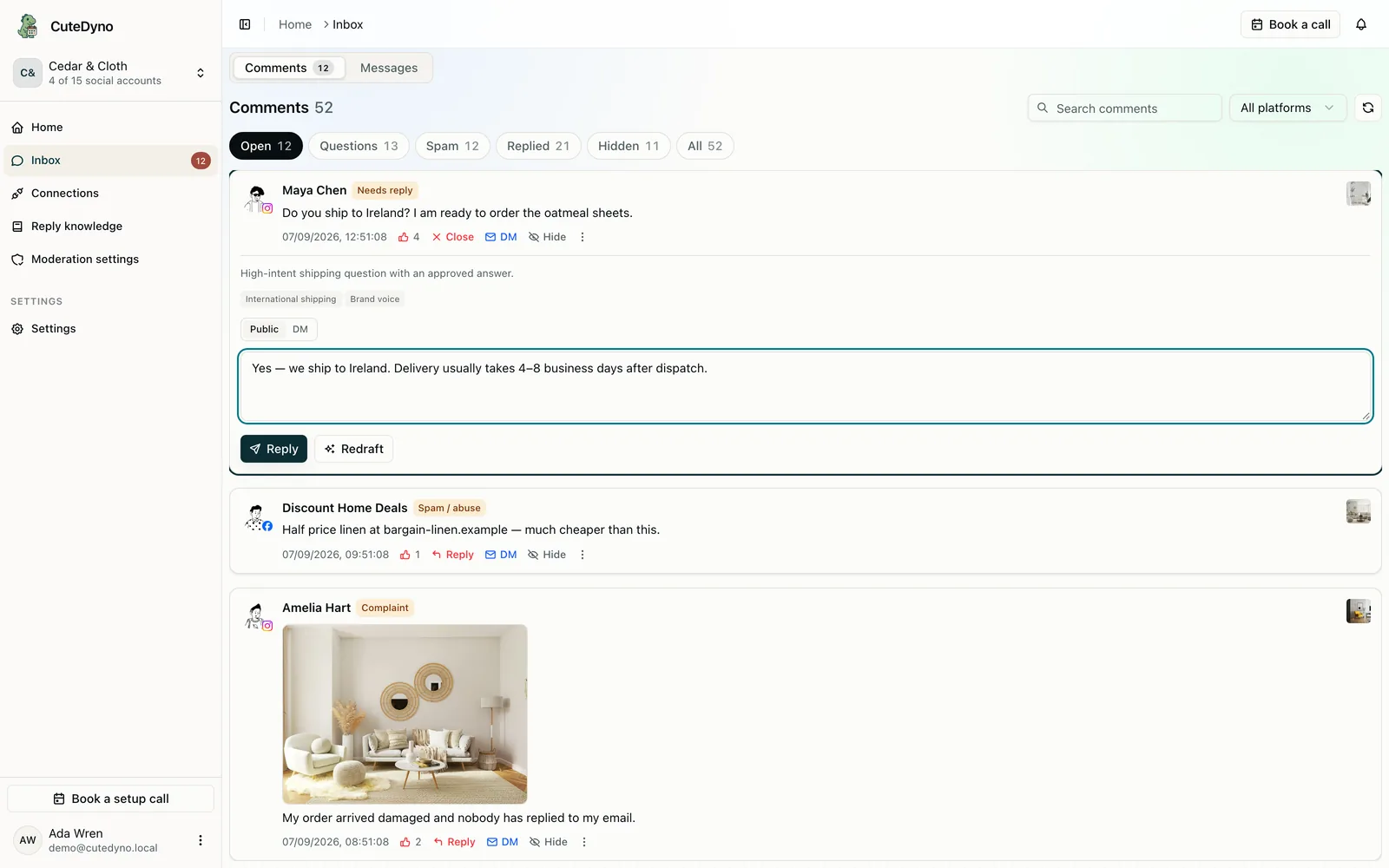
The reply draft cites the approved knowledge it used, so the reviewer can check the source before posting.
AI should draft from facts you control, not invent product details. If the relevant answer is absent or ambiguous, it should send the comment to a person. Learn more about AI-assisted Facebook and Instagram replies.
5. Choose the right level of automation
Automation should match campaign risk, team maturity, and the cost of a wrong action. CuteDyno offers four operating modes:
- AI copilot: classify and draft while a person approves every action
- Smart cleanup: automatically hide only high-confidence spam and abuse
- Sales assistant: hide obvious spam and answer safe FAQs from approved knowledge
- Campaign shield: hold every new comment until a person approves it
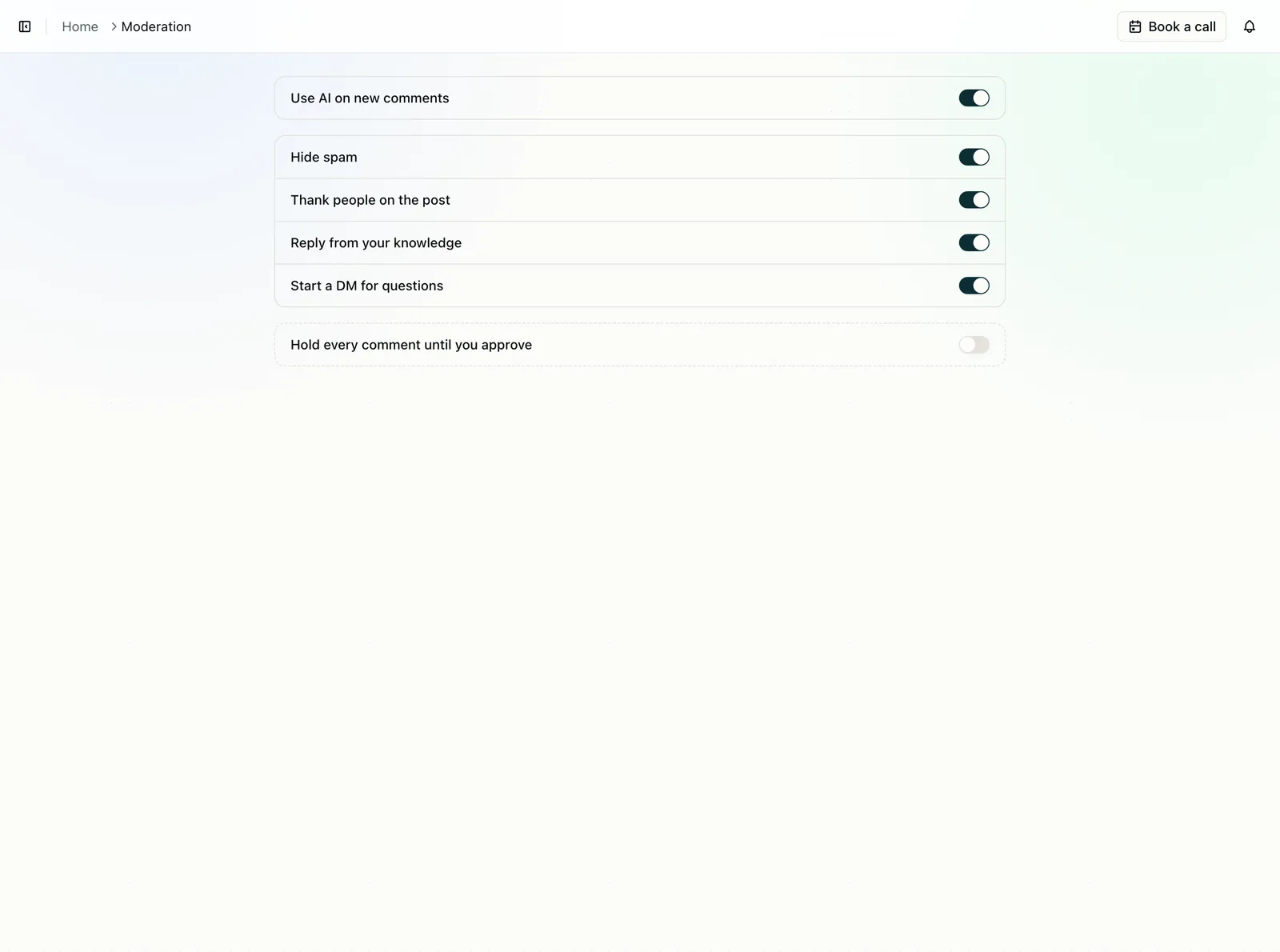
Smart cleanup is a practical starting point: obvious spam is hidden while replies and uncertain cases stay with the team.
Start conservatively. Run AI copilot or Smart cleanup for a week, inspect false positives, and expand only after you understand your comment mix. Use Campaign shield for a sensitive launch when the reputational cost of even a short-lived harmful comment is unusually high.
Compare CuteDyno's AI moderation modes.
6. Ground replies in a brand knowledge base
A good knowledge base is short, current, and owned. Add only facts the system may safely use:
- Shipping regions and realistic delivery windows
- Price, stock, launch dates, and active promotions
- Returns, cancellations, and warranty rules
- Product fit, sizing, ingredients, and compatibility
- Support channels and escalation paths
- Tone guidance
- Claims the brand must never make
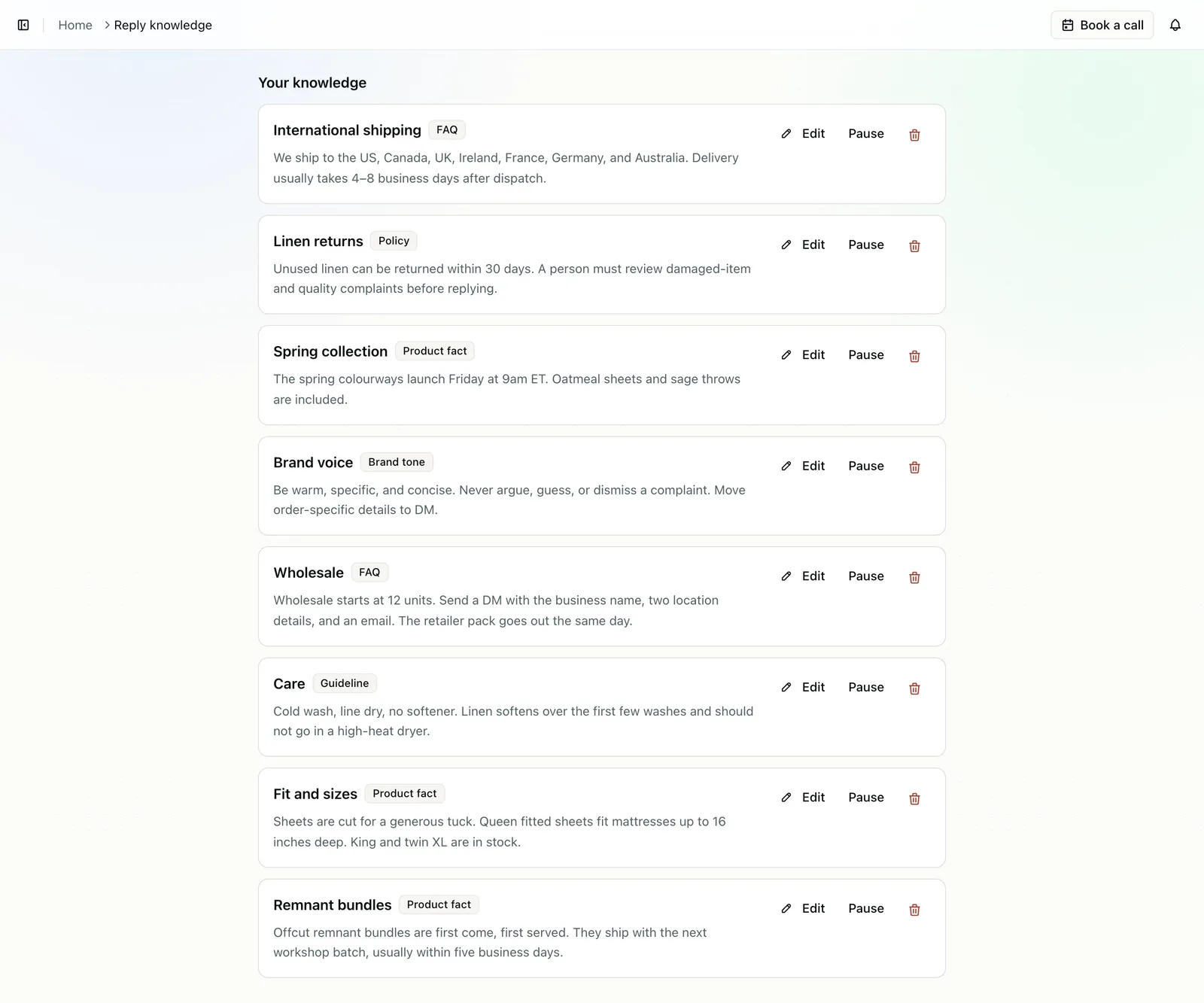
Each knowledge item has a clear type and can be edited or paused when the underlying policy changes.
Assign an owner and review date to every high-impact fact. A fast reply with an expired promotion or inaccurate delivery promise can create more harm than no reply.
See how a reply knowledge base works.
How to prioritize when you cannot review everything
The ideal is complete visibility across paid and organic surfaces. The practical queue should still be risk-based.
Review in this order:
- Active scams, impersonation, threats, and malicious links
- High-spend ads and launch campaigns
- Buyer questions with clear purchase intent
- Service complaints and product-risk claims
- Fast-growing Reels or posts receiving a sudden comment spike
- Older evergreen ads that continue to spend
- Routine praise and low-risk discussion
Build alerts around velocity as well as individual messages. Ten similar complaints in fifteen minutes may indicate a broken checkout, fulfillment issue, misleading creative, or coordinated attack. The pattern matters more than any one comment.
Agencies should separate accounts, policies, knowledge, and audit history by client. A shipping answer that is correct for one store can be a serious error for another. Use our agency client onboarding checklist and guide to managing multiple client social accounts to assign access and escalation ownership.
A response policy your whole team can follow
Write the policy before turning on automatic actions. Keep it short enough that a weekend reviewer can use it.
For every category, define:
- Three real examples
- Default action
- Exceptions
- Response owner
- Target response time
- Evidence-retention rule
- Escalation contact
Suggested targets:
| Priority | Example | Target |
|---|---|---|
| Urgent | Fake support account collecting payments | As soon as detected |
| High intent | “Does this fit a king-size bed?” | During the active working session |
| Service | “My package has not arrived” | Within the published support SLA |
| Standard | Product feedback, praise, general discussion | Within one business day |
Do not promise round-the-clock coverage if you cannot staff it. Instead, align campaign schedules with moderation capacity and use higher-protection modes outside working hours.
How to measure whether moderation improves ROAS
Do not look at ROAS before and after one busy week and declare causation. Creative fatigue, seasonality, discounts, audience mix, attribution windows, inventory, and landing-page changes can move performance at the same time.
Build a measurement chain.
Operational metrics
- Percentage of active campaigns covered
- Comment volume by platform and campaign
- Spam and abuse rate
- Median time to hide a confirmed scam
- Median time to first useful reply
- False-positive hide rate
- Missed-spam rate
- Percentage of buyer questions with approved answers
- Percentage of escalations resolved within SLA
Funnel metrics
- Outbound click-through rate
- Landing-page view rate
- Conversion rate
- Cost per acquisition
- Revenue per visitor
- ROAS
A practical test design
- Choose comparable campaigns with similar creative, audience, offer, spend, and placement mix.
- Establish a baseline for comment volume, response time, conversion rate, CPA, and ROAS.
- Apply the written moderation policy consistently to the test group.
- Keep creative, landing pages, offer, attribution settings, and budget strategy stable where possible.
- Tag campaign links consistently. Our UTM parameter guide explains a clean naming system.
- Run long enough to gather meaningful conversion volume.
- Review both performance and safety metrics. A ROAS gain is not acceptable if legitimate criticism is being hidden.
An ethical test should never deliberately leave fraud, threats, or dangerous content visible. Compare workflow coverage, response speed, or automation levels while applying minimum safety rules everywhere.
Report the result in layers:
“Median buyer-response time fell from 6 hours to 38 minutes. Confirmed scam exposure fell by 84%. Conversion rate increased 7% during the test, while CPA decreased 5%. ROAS improved from 2.8 to 3.0, but the test cannot isolate moderation from every external factor.”
That statement is more credible than promising an unsupported percentage lift.
Native Meta controls and when a shared inbox helps
Meta's native tools are the baseline, not the enemy.
Use native controls for:
- Facebook Page blocked words and profanity filters
- Instagram Hidden Words and custom terms
- Manual hide, delete, report, restrict, and block actions
- Reviewing a specific ad in Ads Manager
- Account-level access and permissions
Add a shared moderation workflow when:
- You manage multiple Facebook Pages or Instagram accounts
- Paid and organic comments are split across tools
- Dark or unpublished ad posts are easy to miss
- Several teammates need one queue
- You need consistent action rules across brands
- Reply accuracy depends on approved product facts
- You need an audit trail for automatic actions
- Manual checks cannot keep up with comment volume
Coverage depends on Meta permissions, account type, API support, and placement. After connecting a tool, post a test comment to every critical surface and confirm that it appears before relying on automation.
The 30-minute weekly review
Automation needs maintenance. Use this weekly routine:
- Restore any legitimate comment hidden by mistake.
- Narrow the rule or confidence threshold that caused each false positive.
- Review spam the system missed and group new patterns.
- Turn repeated buyer questions into approved knowledge.
- Remove expired promotions and outdated policy answers.
- Check every active campaign for comment coverage.
- Review complaint clusters with support, product, or fulfillment owners.
- Compare response time and conversion trends without assuming causation.
- Record policy changes for the next reviewer.
This feedback loop matters more than building a giant keyword list once and forgetting it.
Meta comment moderation checklist
- Every Facebook Page and Instagram professional account is inventoried
- Active ads, boosted posts, Reels, and organic posts have tested coverage
- Dark or unpublished ad posts are included where supported
- Scam, spam, abuse, complaint, buyer question, and escalation rules are written
- Honest negative feedback is not automatically removed
- Automatic hiding starts with high-confidence patterns
- Every automatic action keeps an audit record
- Product, shipping, returns, and promotion facts have owners
- Sensitive claims always go to a person
- Campaign launches have named moderation coverage
- False positives and missed spam are sampled every week
- ROAS claims are supported by controlled measurement, not anecdotes
FAQ
Do Facebook and Instagram comments affect ROAS?
They can influence ROAS indirectly by changing trust, click behavior, product understanding, and conversion. There is no guaranteed lift, and Meta does not publish evidence that hiding a comment by itself improves auction delivery. Measure conversion, CPA, and ROAS alongside moderation coverage and response time.
Should I hide negative comments on Meta ads?
Do not hide a comment merely because it is negative. Keep honest criticism visible and respond with useful facts. Hide spam, scams, impersonation, malicious links, targeted abuse, hate, and other content that violates your written policy.
Is hiding better than deleting a Facebook comment?
Hiding is often the safer first action for obvious spam because it can preserve the item for review or restoration. Delete when permanent removal is required by policy or safety needs. Platform visibility rules can vary, so verify behavior in the current Meta interface.
Can I moderate comments on Facebook and Instagram ads in one place?
Yes. A shared inbox can combine supported Facebook and Instagram comments across connected accounts. Test each Page, professional account, ad format, and placement because coverage depends on permissions and platform support.
Can AI automatically hide spam comments?
Yes. Start with narrow rules and high confidence thresholds, keep an audit trail, and review samples every week. Ambiguous criticism, legal claims, product safety, sarcasm, and uncertain context should stay with a person.
Can AI reply to buyer questions?
AI can draft or send replies when the platform allows it and your policy enables it. Replies should use approved brand knowledge, show which facts were used, and refuse to guess when the answer is missing.
How quickly should we reply to ad comments?
Prioritize by risk and buying intent. Address active scams as soon as detected, answer high-intent questions during the working session, and handle service issues within your published support SLA.
Do I need to monitor organic posts as well as ads?
Yes. Prospects often visit the profile or Page after seeing an ad. Organic comments, Reels, and older posts contribute to the same perception of your brand even when they are not part of the paid placement.
What is a dark ad comment?
It is a comment under an unpublished ad post that may not appear on the normal Page feed. Your workflow must be ad-aware so the team does not assume that checking recent organic posts covers every paid conversation.
How do I prove moderation improved ROAS?
Use comparable campaigns, stable creative and offers, consistent attribution, sufficient conversion volume, and a documented moderation treatment. Track operational metrics first, then CTR, conversion rate, CPA, and ROAS. Report limitations instead of promising a universal percentage lift.
Protect the conversation you are paying to distribute
Your ad does not stop at the caption and creative. The comments beneath it become live public context for every prospect who pauses to read.
CuteDyno brings supported Facebook and Instagram comments into one inbox, identifies spam and buyer questions, hides high-confidence harm, drafts replies from approved brand knowledge, and keeps complaints and uncertain cases with your team.
Start your 7-day CuteDyno trial, compare plans, or see the Facebook and Instagram comment workflow.