How to Create a TikTok Posting Schedule That Actually Grows Your Account
How to create a TikTok posting schedule that grows your account starts with three decisions: when your audience is online, how often you can post without sacrificing quality, and what content mix you will rotate. Random posting teaches the algorithm nothing. A consistent schedule trains distribution, compounds learning, and turns growth from luck into a system.
Pair this guide with how to go viral on TikTok, best times to post, how many posts per day, and the free content calendar template. Start scheduling on CuteDyno or compare pricing when you manage multiple accounts.
Quick Answer: What Makes a Good TikTok Schedule?
A growth-focused TikTok schedule posts when followers are most active, at a sustainable frequency (usually 5–7 videos per week), with a rotating content mix and 20–30% flexibility for trends. Batch-create in blocks, schedule in advance, and review analytics weekly to refine times and topics.
Why a Schedule Matters in 2026
Consistency signals that your account is active and worth recommending. Over time TikTok learns:
- Who engages with your content
- When your audience is online
- Which formats retain viewers
Without a schedule, you post in bursts and disappear, exactly the pattern that stalls growth. With one, every week adds data the algorithm can use. Content quality still comes first; see the TikTok growth resources hub for hooks and retention tactics.
Step 1: Find Your Best Posting Times
Use TikTok Analytics
- Go to Profile → Menu (≡) → Creator tools → Analytics
- Open Followers → Follower activity
- Note peak hours by day of week
Post inside those windows when possible. For a structured test method, follow best time to post on Instagram and TikTok.
Baseline windows (adjust with your data)
| Day type | Common peaks (local time) |
|---|---|
| Weekdays | 7–9 AM, 12–2 PM, 7–10 PM |
| Weekends | 9–11 AM, 7–9 PM |
Younger audiences often peak evenings; B2B niches may peak lunch hours. Trust your analytics over generic advice.
Step 2: Choose Posting Frequency
| Frequency | Best for | Effort |
|---|---|---|
| 3–4x/week | Minimum viable consistency | Low |
| 1x/day | Steady growth for most creators | Medium |
| 2–3x/day | Faster testing, more data | High |
Start with one post per day if you are building the habit. Increase only when quality stays high. The algorithm rewards regularity more than occasional bursts.
Step 3: Build Your Content Mix
Rotate formats instead of repeating one style:
- Educational, How-tos, tips, explainers
- Entertainment, Trends, humor, reactions
- Story / BTS, Process, day-in-the-life, wins and fails
- Engagement, Questions, polls, "comment if…"
- Hook-driven, Strong open, fast payoff
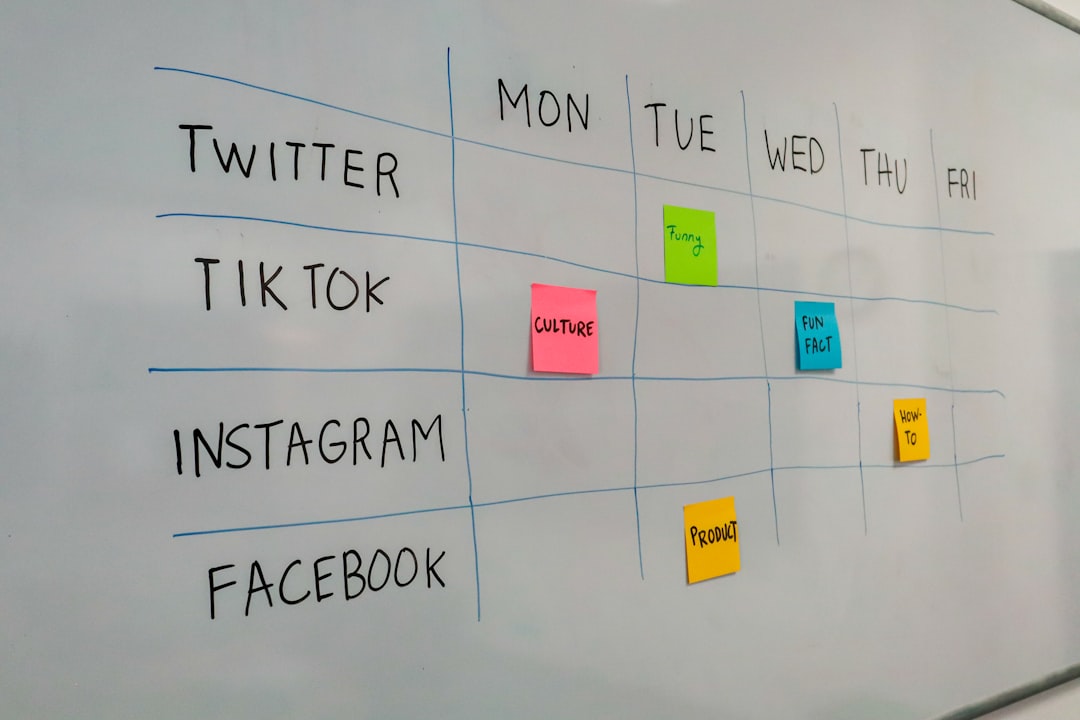
Sample weekly rotation: Mon how-to, Tue trend, Wed tips, Thu story, Fri debate question, Sat entertainment, Sun recap.
Stuck on topics? Use the content ideas generator or adapt ideas from 50 TikTok content ideas.
Step 4: Batch Create Content
Record and edit in sessions, not one video at a time:
- Pick 2–3 themes per batch day
- Film multiple takes in one session
- Edit in a single block (captions, safe zones, sound)
- Draft captions with the TikTok caption generator, then personalize
- Upload and schedule for the week
Batching protects consistency when life gets busy. Limit sessions to 1–2 hours to avoid burnout.
Step 5: Build a Weekly Calendar
Use a spreadsheet or free content calendar template. Add:
- Post date and time
- Topic and hook
- Audio / trend notes
- Status (filmed, edited, scheduled, live)
Placeholders reduce daily decision fatigue. You can refine copy later; empty slots are the enemy.
Step 6: Use Scheduling Tools
Options in 2026:
- TikTok native scheduler, Built into Creator/Business accounts
- CuteDyno, Multi-platform scheduling, client profiles, approval flows
- Other tools, Compare in affordable scheduler guide
Upload when you batch, set times to match peak activity, and let posts publish automatically. Schedule TikTok posts covers setup details.
Step 7: Leave Room for Trends
Reserve 20–30% of slots unplanned. Trending sounds and reactive memes often outperform scripted posts, but only if you have capacity to film within 24–48 hours. A rigid calendar with zero flexibility misses timely reach.
What to Avoid
- Random posting times every day
- Sacrificing quality for quantity
- Ignoring analytics for months
- Same format every single post
- Scheduling so far ahead that content feels dated
- Watermarked cross-posts from other platforms
Track and Adjust Weekly
Review Analytics every week:
- Top posts by reach and watch time
- Which time slots drove the most engagement
- Which content types completed best
Double down on winners. Pause formats that repeatedly underperform. Retest posting times every 3–6 months as habits shift.
Sample Schedule Template
Goal: 1 post/day, 7 days/week
- Mon–Fri: 7–8 PM (after work/school)
- Sat–Sun: 10–11 AM (weekend scroll)
Content rotation: Mon how-to · Tue trend · Wed list/tips · Thu BTS · Fri question · Sat entertainment · Sun recap
Frequently Asked Questions
What if I cannot post every day?
Post as consistently as you can, 4 times per week still helps. Regular beats sporadic: seven posts one week and zero the next hurts more than steady four-per-week output.
Should I schedule TikToks weeks in advance?
Schedule core content 1–2 weeks out. Keep trend slots open. Reactive posts often win short-term reach.
How do I batch-create without burning out?
Theme your sessions, cap recording at 60–90 minutes, and separate filming from editing. Stop when ideas feel forced, quality drops fast.
What if my best time is when I am asleep?
Use a scheduler. You do not need to be awake at 7 AM to post at 7 AM. Try CuteDyno free.
Can I reuse the same schedule for Instagram?
Mirror the planning logic, batching, mix, analytics, but test each platform separately. Optimal times and formats often differ. Schedule Instagram posts on its own cadence.
Does posting more than once a day help growth?
It can if quality holds. Multiple daily posts give more algorithm tests. If quality drops, scale back to one strong post per day.
A TikTok posting schedule that grows your account combines peak-time publishing, sustainable frequency, varied formats, batch creation, and trend flexibility. Start simple, use analytics to refine, and automate publishing so consistency survives busy weeks.
More to read: Best Time to Post · Schedule TikTok Posts · Go Viral on TikTok · Affordable Scheduler · TikTok Growth Resources