
Hi — I’m Sandeep, founder of Cutedyno.com, a social media scheduler built for hustlers like you. Today, I want to share a deep, founder-level guide on the best time to post on Instagram — covering data, nuances, strategies, examples, FAQs, and how to implement it in your scheduler. Use this as your “playbook” to win engagement.
Why timing still matters (even in an algorithm world)
Before we get into “when,” let’s talk about why this even matters. Many people believe that since Instagram is algorithmic (not strictly chronological), posting time doesn’t matter. That’s only half true.
Key reasons timing matters:
-
Initial engagement window Instagram gives a content piece a “boost” early on. If within the first 30–60 minutes (or first few hours) your post gets good engagement (likes, comments, saves), it’s more likely to be shown to more of your followers or pushed to Explore / Reels. Posting when your audience is active gives you the best shot to hit that boost window.
-
Feed competition & noise Posting during peak hours means you compete with many other posts. Posting just before or just after a peak can reduce noise and improve visibility. There’s a “sweet spot” where enough users are active but saturation isn’t too high.
-
Time zones & audience behavior Your audience might be spread across time zones or following certain daily routines (morning commute, lunch break, evening scroll). You need to align with their patterns, not your own.
-
Content type & format differences A Reel, image, carousel, or Story may perform differently at different times. For example, users might watch Reels in the evening, but scroll image posts during mid-day breaks.
-
Consistency & branding If your audience expects content at certain times, consistency builds habit. Over time, your “optimal posting times” reinforce habituation among your followers.
So yes: timing is not everything, but it’s a multiplier. Think of great content + smart timing + consistency = compounding growth.
What the data says (2025 research)
Here’s a breakdown of what recent studies suggest about optimal posting times. Use these as benchmarks — not sacred rules.
| Source / Study | Key Findings / Recommended Times |
|---|---|
| Sprout Social (2025) | Mondays through Thursdays between 10 AM and 3 PM are generally optimal. ([Sprout Social][1]) |
| Buffer (>2M posts) | Weekday peaks around 3 PM and 6 PM produce high reach. ([Buffer][2]) |
| Iconosquare | Afternoon posts 2–4 PM do well; 8 PM is good for evening engagement. ([Iconosquare][3]) |
| SocialPilot | Ideal windows: 7 AM–11 AM and 1 PM–3 PM (weekdays) ([SocialPilot][4]) |
| Later (6M posts) | Their overall best time: 5 AM (global average). ([Later][5]) |
| Social Media Today / Sprout Social (2025) | Reinforce Mon–Thu mid-day window. ([Social Media Today][6]) |
| RecurPost (2M posts) | High-performing slot: Thursday 9 PM, plus evenings 8–10 PM on Wed / Sun ([RecurPost][7]) |
| Zeals.ai | Morning (9–11 AM) and late evening (7–10 PM) are prime; lunch (12–3 PM) also good. ([ZEALS.ai][8]) |
| Analyzify / Buffer | Best times often early morning (7–8 AM) on weekdays. ([Analyzify][9]) |
Observations & tensions between data
- There is no universal “best time” that always works. Different studies show peaks in early morning, mid-afternoon, and evening windows.
- Early-morning posts (e.g. 5–8 AM) often show up in global average datasets (e.g. Later) — likely because fewer people post then, reducing noise. But whether it works for your audience is another matter.
- The mid-day window (10 AM–3 PM) appears frequently as a “safe bet” across multiple studies.
- Evenings (7 PM–9 PM) show strong performance, especially for Reels or non-work-hour content.
So the pattern: morning, lunch/early afternoon, and evening are three general windows you should thoughtfully test.
How to find your best time (for YOUR audience)
Because your audience’s habits may differ (geography, work schedules, age group, etc.), you should discover your own optimal times. Here’s a step-by-step:
1. Audit your existing posts (Instagram Insights)
- For a period (e.g. last 30–90 days), extract timestamp, reach, engagement (likes + comments + saves) of your posts.
- Group by hour-of-day and day-of-week.
- Compute engagement per follower reach (normalized metric) to see which time bins punch above average.
- Identify top 2–3 windows (e.g. 12–1 PM on Tue/Thu, or 7–8 PM on weekdays).
Instagram Insights gives you “When your followers are online” charts — start there as a hint.
2. Do A/B / multivariate time tests
- Over 2–4 weeks, post similar content (style, quality) at different candidate times (e.g. morning vs afternoon vs evening) on similar days.
- Compare performance (reach, saves, comments) relative to your standard baseline.
- Don’t overcomplicate — keep content consistent so time is the only variable.
3. Segment by content type & format
- Try Reels, Feed posts, Carousels, and Stories in different time windows.
- Maybe your audience watches Reels more in the evening, but engages image/carousel posts during lunch breaks.
4. Segment by audience clusters / time zones
- If you have followers across multiple time zones (e.g. India + US), you may need a “split strategy” — post twice (or schedule regionally).
- Use your analytics to see where your active users are located (Cities / countries) and match windows.
5. Review and iterate every month / quarter
- Audience behavior shifts (new followers, algorithm shifts, content rhythm). So your “best times” should be periodically re-evaluated.
6. Use automation & smart scheduling (like Cutedyno)
- In your scheduler, allow “best windows” or “smart scheduling” that picks the optimal slot (based on past data).
- Allow manual override if you want special posts at non-standard times.
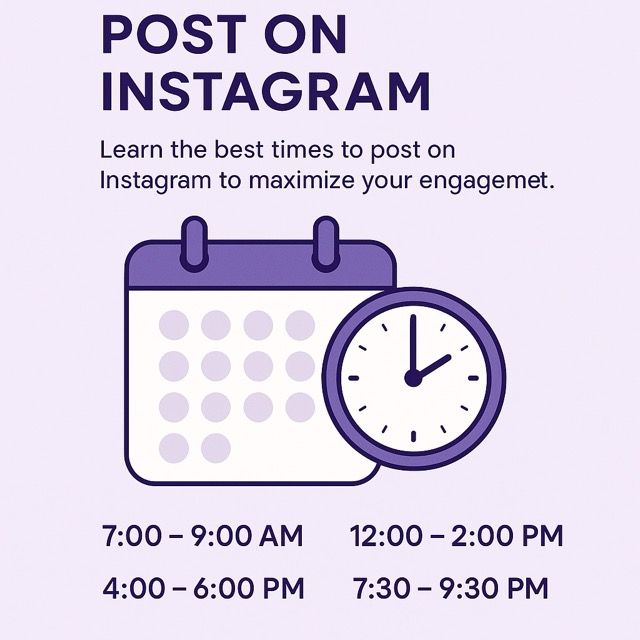
Suggested “starter windows” (for India / IST context)
Given that most benchmark data is global or US-based, here’s a tentative “starter schedule” for Indian / IST audiences (you should test and confirm). (Note: many global studies assume local time equivalence.)
| Time window | Use case / rationale |
|---|---|
| 7:00 – 9:00 AM | Early morning check-ins, before work/day begins |
| 12:00 – 2:00 PM | Lunch break scroll time |
| 4:00 – 6:00 PM | Post-work stress break or commute |
| 7:30 – 9:30 PM | Evening scroll / unwind time |
| Late night (10:30 PM – 12:00 AM) | Optional for certain demographics (night owls) |
Typically, mid-day (12–2) and early evening (7–9) tend to do well in Indian audience experiments. But again — test & confirm.
How to integrate this in Cutedyno (your scheduler strategy)
Since you’re building / using a scheduler (like Cutedyno), here’s how to bake in timing intelligence:
-
Best Slot Selector / Smart Suggestion
- Based on your historical posting & performance, suggest 2–3 “optimal time slots” per day.
- If user picks “auto-schedule,” send into those slots.
-
Time Zone Awareness & Follower Cluster-based scheduling
- If audience spans multiple time zones, allow splits or weighted scheduling (e.g. 60% in IST window, 40% in US-friendly window).
-
Time Slot Blacklist / “Don’t post between these hours”
- E.g. avoid 3–5 AM, or times historically underperforming.
-
A/B Time-variant Testing mode
- Let users schedule the same content at variant times to test performance. Auto collect results.
-
Visualization dashboard
- Show heat maps of engagements vs posting time.
- Allow users to see “best hours by day” visually.
-
Notifications & nudges
- If user tries to post at a “low engagement time,” remind them that a better window exists.
-
Flexible override for events / breaking posts
- Always allow manual override for timely or spontaneous content.
Example timeline / posting plan (for a week)
Here’s a sample schedule for a page targeting Indian audience (assuming you test and validate these slots):
| Day | Post Time | Type / Format |
|---|---|---|
| Monday | 7:30 AM | Motivational quote / teaser |
| Monday | 12:30 PM | Carousel / tips |
| Tuesday | 1:00 PM | Infographic / how-to |
| Tuesday | 7:45 PM | Reel / video |
| Wednesday | 8:00 AM | Quick tip reel or story |
| Wednesday | 5:30 PM | Engagement post / poll |
| Thursday | 1:15 PM | Educational carousel |
| Thursday | 8:00 PM | Reel / video |
| Friday | 12:00 PM | Fun / lighter content |
| Friday | 7:30 PM | Weekly wrap-up / call-to-action |
| Saturday | 10:00 AM | Visual / lifestyle / UGC post |
| Sunday | 7:30 PM | Relaxed content / recap / story |
You might start with 1–2 posts per day in different windows and then refine.
Common FAQs
Q: Is there a “best time” that works for everyone? A: No. All benchmark data are indicative. Your audience’s habits, location, niche, and content style can shift optimal windows. Use data + testing to find your sweet spots.
Q: Should I always post at the “peak hour”? A: Not necessarily. Posting exactly at peak means more competition. Sometimes just before or just after can yield better visibility (less noise). Also, if your content is highly engaging, a slightly off-peak time may still perform very well.
Q: How many times per day / week should I post? A: Quality > quantity. Many successful accounts post 3–7 times/week for Feed + 1–3 Reels/Stories interspersed. Overposting can dilute performance. ([BlackHatWorld][10])
Q: Do Reels / videos follow different timing rules than static posts? A: Yes — often Reels get more traction in evening leisure hours. So test separately. Some studies suggest Reels do better when posted 2 PM–5 PM or around 7 PM–9 PM. ([Iconosquare][3])
Q: What’s the “worst time” to post? A: Very early (e.g. 2 AM to 4 AM) or late mid-night slots often see low engagement because fewer users are online and content is buried quickly. But interestingly, some studies show early morning hours (pre-dawn) can be underutilized windows with less noise (e.g. Later’s 5 AM data) ([Later][5]). It’s risky but can be worth testing.
Q: What if my audience is global (e.g. US + India)? A: Use a staggered / split posting schedule. For example: post one piece optimized for IST window, another optimized for US peak times. Or duplicate content with timezone-appropriate timing.
Q: Do hashtags, captions, or tags affect timing significance? A: Yes — strong captions, timely hashtags (e.g. trending topics), localized tags, and engagement prompts (call-to-action) amplify performance within your time window. Timing is an enabler, not a substitute for good content.
Q: How often should I re-evaluate my “best times”? A: Every 1–3 months. Algorithm updates, shifting follower demographics, or content strategy changes can shift optimal windows.
Summary & “Founder’s prescription” (from Sandeep @ Cutedyno)
-
- Use benchmark data as starting points (e.g. 10 AM–3 PM midweek, 7–9 PM evening) but never blindly follow.
-
- Always analyze your own data (Instagram Insights) to find your best windows.
-
- Run controlled tests (same style content at different times) to isolate time impact.
-
- Segment by content type (Reels vs Feed vs Stories) — each may prefer different slots.
-
- Use tooling / scheduling intelligence (like Cutedyno) to automate, suggest, and avoid bad times.
-
- Stay flexible — adapt when you see changes (new followers, region shifts, behavior change).
-
- Don’t overpost. Maintain a consistent schedule but prioritize content quality.